
Quick Answer
When you build your website, your costs can be low depending on what choices you make. The main annual charges include your hosting provider, domain registration fees, and SSL certificate. There may be additional costs depending on what route you take to build your site, for example, premium plugins, full-featured building platforms, and credit card processing fees. There are “free” solutions available, but you will lose control over some portion(s) of your website. I will not cover them in this article due to the limitations and problems they possess.
Introduction
So, you are thinking about building your website fantastic!
Let me share a secret with you. If you take the time to learn all the necessary steps, anyone can build a website. If this is the case, then why doesn’t everybody develop their website on their own? One word answer, time. Time is one of the essential parts of building a website that you can not get around. If you have plenty of time, then with a little know-how, you will create your website.
Here is the next part, how much money is this project going to cost? Well, that depends on several variables, and most of the time, if you make a mistake, you will adjust as necessary. Let dig into some of the nitty-gritty.
Hosting

What is a hosting provider?
To answer this, I will start by telling you what hosting is in the first place. When you go out into the internet and go to someone’s website, you download all the files to your device from another person’s computer. Typically, a big and powerful computer that costs quite a bit to maintain. Unless you share your website’s files from your computer, you, as a website owner, will pay a hosting company to hold and transmit your website’s assets.
Why don’t you use your computer to host your website? Self-hosting is an option, but unless you have a pure fiber-optic or T1 connection to the internet and a robust multi-core multi-CPU home-built server, you will have a problem with your home server crashing if too many people are on your site at once. For a few hundred dollars a year, you will be able to handle thousands of visitors a month. Building a home server that can take some good traffic and not crash with every traffic spike can cost $2000 on the low end. This estimate does not even include your internet cost, which could cost hundreds of dollars every month depending on your area.
I will gladly pay a company to handle all of this for me. As my site grows and I need a more substantial server, my hosting company can migrate my website to a more robust server that can handle the traffic.
Some examples of hosting providers that I recommend are Bluehost and SiteGround. Bluehost is a great place to start when you are just playing around and trying to learn. SiteGround is another excellent company that can defiantly handle you once you get a little bigger and generate significant traffic.
Hosting Cost
Hosting costs can range depending on what hosting provider you choose and what features you need. Most hosting companies will offer promotions when you first sign up. Just starting, you should expect to pay as little as $5 a month on the super low end and as much as thousands a month to support a massive site with millions of pages-views every month. The average cost for a website that averages 100,000 page views a month should run you around $20-30 every month, depending on many different variables.
Domain Names
What is a domain name?
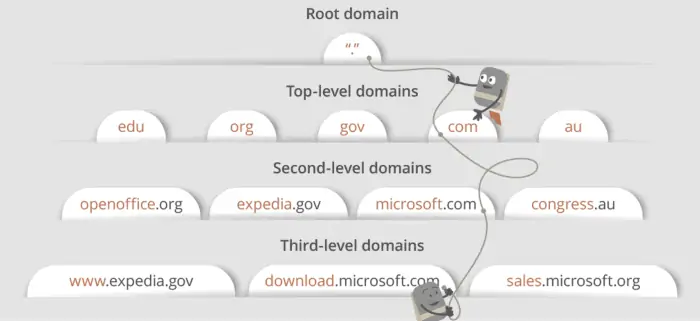
Looking at a web address, everything after the HTTP(s):// is part of your domain name. The domain name is what you type into a browser’s URL or address bar. Your browser will then go out and determine your website’s server’s IP address and download the content. Without domain names, we would all need to memorize IP addresses to access the websites we want to visit.
Why do I need to register a domain name?
When you register a domain name, you are staking your claim to that web address on a global database.
Some people have created a job out of buying and selling domain names. A suggestion, once you own your domain name, be sure you turn on auto-renew. Correctly managing your domain name will reduce your risk of losing it to a domain-hunter. If this happens to you, you will need to purchase your domain name back from them, possibly for thousands of dollars.
Where do you register a domain name?
To register a domain name, you must go to a domain name registrar. They can be found all over the internet. However, I typically like to keep my domains where I host my websites. If I move a site to a different hosting company, I will also transfer the domain name. You do not need to do this, but I feel that it helps keep me organized.
Register Privacy Protection
Most registrars will offer domain name privacy protection. What this will do is replace your personal information on the Whois database with the registrar’s information. This privacy protection will make it appear that the registrar purchased the domain. The Whois database is a public listing of all domain names. Anybody can look up any domain name and see who registered it. I recommend this add-on when you purchase your domain if you do not want your information or identity discovered by random people, corporations, or spammers.
Domain Cost
Most domain registrars will have a promotion when you first purchase your domain. After that, you should expect to see the top-level domain “.com” to average around $18 a year. Other top-level domains can are priced differently from year to year. Privacy protection will be in the ballpark of $15 if you choose to use it.
SSL Certificates

What is an SSL certificate?
SSL is an acronym for Secure Sockets Layer, but this does not shed any light on what the SSL Certificate is, does it? I will give you the short version. An SSL certificate is similar to an encryption key used by your web browser and a web server to secure your information as it flies around the internet. People or programs can intercept this communication, once it leaves your computer, to steal your personal information. This information can contain your name, address, credit card information, or anything else that you enter into a form. When using an SSL Certificate on a web server, this information is encrypted so that if someone intercepts the data transmission, your information is unreadable.
So, do I need an SSL certificate?
I recommend that all websites protect their visitors with an SSL certificate even if you do not accept personal information or payment details. Modern browsers will often notify visitors that a website they are visiting may not be secure, and because of that popup, you will lose some visitors. Google and other search engines will also rank you slightly higher for having an SSL. This metric has not been a massive factor in ranking on Google. However, if Google has a hard time picking between you and another site, SSL will become a factor in who will rank first.
SSL Cost
Some hosting companies will include an SSL certificate with their hosting plans. Both Bluehost and SiteGround provide basic level SSL certificates with the majority of their subscriptions. GoDaddy charges around $79.99 every year until you go all the way to their “Maximum” plan, which is $24.99 a month.
Website Building

What are some different website building platforms?
Okay, here comes the fun stuff. Up until this point, we were talking about the backend of your website. In this section, while you will be building a portion of your site on the back end, this is the meat and potatoes that your visitors will get to see.
There are so many ways to build a website. The most hands-on and completely controlled way to develop a website is by hand-coding using several web programming languages that all work together. Depending on what you want to accomplish, the most common languages you will use are HTML, CSS, PHP, and JavaScript. This form of website building requires the most extensive learning curve and skill level. If you want to learn how to use these languages, you can start learning for free at https://www.W3Schools.com.
On the other side of this spectrum, I would recommend using a CMS or Content Management System. WordPress, Squarespace, Joomla, and Drupal are all examples of a CMS solution. These solutions allow you and me to build a website quickly in more of a visual environment. Hand coding on a CMS is rare but, on occasion, will pop up.
You will find a great deal of debate on the best CMS platform to build a website and what tools you should use on the internet. In my opinion, you should use what is best for you. They all have their positives and negatives. I love and recommend WordPress as my CMS of choice.
What is WordPress?
WordPress is an incredibly versatile CMS that is packed full of potential, and the best part, WordPress is free! This CMS creates for you a skeleton framework to manage all your website’s pages, blog posts, comments, images, and more in a visual web portal that is all hosted by your web server. You have complete control over all of your website’s assets. It has been around for quite some time, first releasing on May 27, 2003, and has consistently increased in popularity ever since. There are a few reasons some people do not like WordPress. Let us talk about two of the big ones.
A complaint that I often hear regarding WordPress is that it is bloated and, therefore, slow. Yes, this can be true, and this is where a little bit of the learning curve comes into play. If you follow a few steps, you can get your website moving to your visitors at incredible speeds. The problem elements to think about here are your picture sizes, the amount of media content on a page, fancy animations, videos that are not lazy-loaded, and the use of way too many plugins can all play a part in a slow website. Some slowness may even come from cheaper, poorly set up hosting companies, so make sure you do your research.
Another big drawback with this platform it is not a complete package where you install it to your server and never need to add any tools. Most people that do not like WordPress do not like it for this reason. I find this to be a positive part of WordPress because I get to use the plugins and tools to customize my site the way that I want. If I do not like how a particular feature works, I can switch the plugin out for a different one. I must have worked through 6 various backup plugins before I finally settled on Wpvivid.
Why does WordPress need plugins?
Developers designed WordPress to be a blank slate, in my opinion. Therefore, they focused on developing a CMS that will help manage all the different moving parts that makeup just about every website. Plugins allow you to add features to your site that the WordPress core does not include. Some plugin features include live chat, remote server backups, eCommerce, social media integration, security, and so many more.
What are premium plugins?
Plugins are classified as premium plugins when people or companies charge a fee for their plugins. Most of these developers believe in free software, so they will usually offer a limited version of their plugin for free. Sometimes their free version will be perfect for your needs, and sometimes the feature you need will only be available in the paid version.
There is one little caveat. If you do not know how to write code, you may not be able to build your website the exact way you want without buying one or more premium plugins. There have only been a few plugins that I have found to be priced way too expensive. When this happens, you take the time to look for a different plugin. I stated earlier, I went through 6 backup plugins before I settled on one, and yes, it is a premium plugin.
Website Building Cost
You can build a website without any added investment other than time by using WordPress.
This section is where you will find an extensive range of costs from free to thousands of dollars every year. Since I focus most of my time on WordPress, I do not know all the other platforms’ costs. After some quick research on the CMSs listed in this post, I found a little information for you to get your research started.
Joomla and Drupal are both open-source CMS platforms and can be downloaded, installed, and used for free. They also have free and paid plugins; however, the terminology is different. Squarespace is a unique situation; they offer plans from $12-40 a month, but it appears that you need to use them to host your website. This structure means you will be giving up a lot of control over your website’s assets, look, feel, and customizability. The cost to use WordPress can range from free to unknown. Unknown because that depends on what you choose, if any, for premium plugins.
Conclusion
Average Cost Breakdown
- Hosting – $5-500 per month or more.
- Domain – $1-100 per year
- SSL – Included with Hosting – $300 per year
- Website Build – Free – $2000 per year or more.
Building a website on your own can cost as low as $61 and as much as $7,000 or more every year.
Okay, but what is the more realistic number, one that you can use to plan? Assuming you have a typical website that is averaging 40,000 page views a month. I would guess the minimum cost breakdown would look like this.
- Hosting – $15 per month
- Domain – $33 per year (with privacy)
- SSL – Included with Hosting
- Website Build – $300 per year (3 Premium Plugins)
Cost Per Year – $513 ($43 per month) With Premium Plugins
Cost Per Year – $213 ($18 per month) Without Premium Plugins
This cost estimate is not too bad, but I think Dentico Web Solutions can help with this price slightly more.
How can Dentico Web Solutions help with these costs?
I have created a service called the WordPress Management Service with two options, with or without hosting. You can choose to use this option even if you develop your website. This service comes with tons of value, but I will only talk about the portions that save you money. That is the topic of this article. You will save on hosting and premium plugin cost. At the time of this article publishing, the premium plugins you would have access to are:
- Divi – Page Builder ($89/year)
- Divi Supreme Pro – Divi Extension ($79/year)
- Divi Essential – Divi Extension ($79/year)
- Divi – The Theme (Part of Divi)
- Extra – The Theme (Part of Divi)
- Bloom – Email Opt-in (Part of Divi)
- Monarch – Social Share and Follow (Part of Divi)
- Wpvivid – Remote Storage Backup Solution ($49/year)
- WP Rocket – WordPress Optimization ($49/year)
- HappyFiles – Image, Page, and Post Organizer ($59 Lifetime)
Totaling $345 Every Year (Not including HappyFiles since it is lifetime)
These premium plugins are all included, but this service has more than just access to plugins. Follow this link Click (More Information) to learn about the time and actual value this service plan will provide you.
Just note, some other fees may apply depending on your circumstance and starts at $20 a month. Adding hosting to your service plan would only be $10 more for lower traffic websites.
Final Words
If you are thinking about developing your website, know that you can do this. If you need help, we would be more than happy to help. Your questions may even become an article on my site that can help thousands of other people. We are building a resource for people and businesses to learn and grow on the internet. We are happy to have helped you along your journey. Have a great day!
Recent Comments